SOLUTION OVERVIEW

Healthcare CRM Software Built for Patient Access

CareDesk, an AI-powered healthcare CRM built specifically for medical professionals, optimizes the patient experience.
SOLUTION OVERVIEW

The Reality without AI

Quote

I have to repeat myself every time. I have to make too many calls, and there’s too much phone tag.

Patients

Patients

Quote

I get called for minor issues, and I must deal with frustrating scheduling errors.

Providers

Providers

Quote

I struggle keeping schedules full and costs down.

Finance

Finance

Quote

Spend so much time with phone tag & outbound calls

1cda1bc2391ef85a98b8e27f7cbacc0a9d3735e3

Coordinators

Create an exceptional patient experience by creating a beautiful staff experience.

Benefits of a Healthcare CRM

Keona built CareDesk to remove complexity for your staff and eliminate errors.

Our patient access platform/CRM standardizes operations while supporting individual provider requirements.

Guided workflows increase care quality, decrease costs, and help manage your key performance indicators.
Benefits of a Healthcare CRM

Streamline ALL of your processes

A beautiful and intuitive interface, powered by expert AI, guides your staff through their workflows, step-by-step, so that they can seamlessly help patients.

Streamline ALL of your processes

Better patient experience

Patient trust begins with a digital front door that lets patients complete their requests in real-time, anytime.

Patient Experience In A Digital Age

Better team experience

Patients are overwhelmed when your staff is overwhelmed. Consolidate and standardize your workflows into a single tool. Improve employee morale and confidence.

Benefits of a Healthcare CRM

Patient access functionality

Many of the above benefits come with additional products and modules. The core functionality, on its own, provides all the benefits you would expect in an advanced healthcare CRM system.

patient_access

Agents & nurses can collaborate in a single workflow tool.
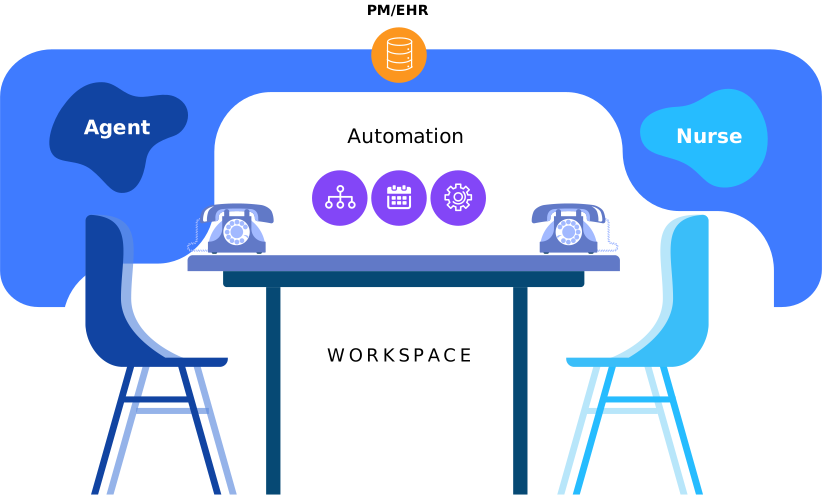
PM/EHR Workspace

· A one-page, digital workspace equips your team with everything they need to solve patient requests.

· The workspace automatically gives your staff all necessary data and integrations in real-time.

· The CRM gives your staff members scripts for all possible patient questions.

· Automated tools ensure efficiency and accuracy as your staff works.

Agent workspace provides complete patient context, service guidance, and task automation

 Use a template or create a custom layout

Use a template or create a custom layout

Specify your workflow and automate decisions

Specify your workflow and automate decisions

 No need to switch screens or make patients repeat information

No need to switch screens or make patients repeat information

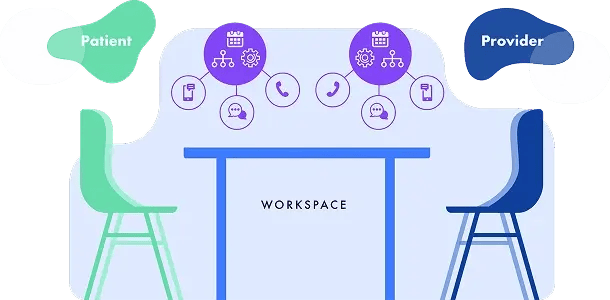
This same logic lets patients answer any questions they have themselves while they’re still connected to the nurse and agent.

Automation that helps your agents also helps your patients.
Workspace
Knowledge Management Auto-display on context, search when needed, send to patients

Knowledge Management Auto-display on context, search when needed, send to patients

Decision

Decision support Scheduling, Symptom Screening, Nurse Triage

Self service

Self-service workspace Patient workspace, provider workspace, automate decisions, provisioning and communication

Process Queues Customize

Process Queues Customize queues, custom automation

Omnichannel access Phone

Omnichannel access Phone, web, mobile, chat

Reporting

Reporting Report on all actions taken, all communications made, performance reports, syndromic surveillance, scheduling stats

The result is an incredibly robust patient experience that will drive your digital transformation:

Digital Infrographics

Elevate both your staff & patient experience with AI-guided workflow management.

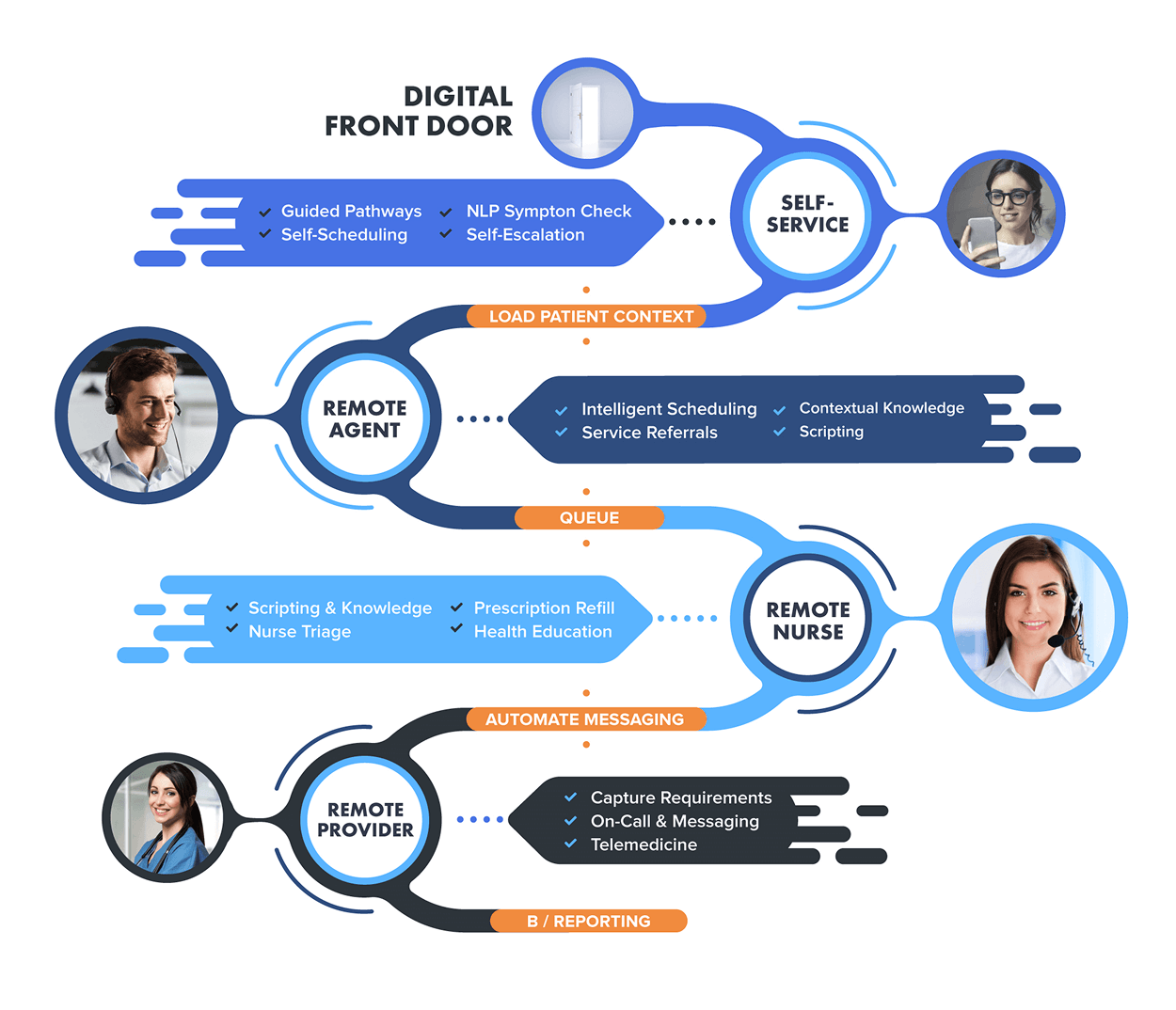
Behind every smooth healthcare experience is a robust workflow. It takes a special workflow tool to standardize work for your staff without sacrificing provider control.

Consolidate

Bring disparate processes together into a one-page flow.

1

Standardize

Remove bottlenecks with data & systems integration.

2

Access

Open the workflow to patients.

3

Automate

Accelerate through automated decisions, actions, communication, and documentation.

4

Optimize

Monitor end-to-end performance and adapt to new use cases.

5

Patient Experience In A Digital Age

The future of patient experience.

Ultimate Guide to Telehealth

Ultimate Guide to Telehealth

Patient Service Maturity Model

Patient Service Maturity Model

Digital Transformation

5 Steps to Telehealth Digital Transformation

Patient Experience In A Digital Age

This same logic lets patients answer any questions they have themselves while they’re still connected to the nurse and agent.

Automation that helps your agents also helps your patients.

FAQ

1. What is CareDesk and how does it help patients?

CareDesk is Keona’s AI-driven healthcare CRM that automates patient access and telehealth services. It centralizes workflows across channels (phone, web, chat), reducing repetitive intake and streamlining navigation through scripts, triage, scheduling, and messaging—all in one interface.

2. Which patient interaction channels does CareDesk support?

It supports omnichannel access: phone, web, mobile, and chat. Whether a patient calls, texts, or schedules online, they’re guided through a consistent, AI-assisted workflow.

3. How can AI improve patient experience in healthcare?

  1. AI-driven workflows:
  2. Autopopulate patient context in real time
  3. Guide agents with scripts and decision logic
  4. Enable intelligent symptom screening and triage
  5. Support automated scheduling, reminders, and follow-up messaging

4. Do patients need to repeat their details using AI-driven CRM?

No, information is captured once and passed through shared workflows. Both patients and staff avoid repeating data as the platform preloads history and request context.

5. How does CareDesk enhance scheduling accuracy?

It integrates intelligent scheduling logic to ensure 100% appointment matching—no overbooking or provider mismatch—whether through self-service or agent scheduling.

6. What role does triage & symptom screening play in healthcare AI-driven CRM?

Built-in symptom checkers and triage protocols guide patients and non-clinical staff to appropriate care options, ensuring safety and routing urgent cases properly.

7. Can patients manage appointments more easily with CRM Ai tools?

Yes, an AI-driven platform can automate self-scheduling, waitlist joins, rescheduling, reminders, and calendar invites, giving patients seamless control over their care journey.

8. How is patient outreach tailored using AI-driven healthcare CRM?

By sending automated personalized messages (via SMS, email, app) for appointments, education, bill/pay reminders, and surveys, improving engagement and compliance.

9. Can AI-driven healthcare CRM integrate with a preexisting healthcare system?

Yes, it connects with 40+ systems, including EHRs and practice management platforms, enabling real-time data sharing and unified patient records.

10. What measurable benefits can organizations expect using AI-driven software in healthcare?

  • Up to 40% reduction in call center operational costs
  • 25%+ improvement in revenue through better engagement
  • 30% faster agent handling and 70% less training time
  • Increased patient satisfaction and retention

11. What is a healthcare CRM?

A healthcare CRM is patient relationship management software built specifically for clinical, scheduling, and contact center workflows. Unlike a generic CRM, a healthcare CRM is HIPAA-eligible, integrates bi-directionally with EHR and PM systems, supports clinical protocols like Schmitt-Thompson triage, and tracks healthcare-specific outcomes such as first-contact resolution and conversion to appointment.

12. What is the best healthcare CRM software in 2026?

The best healthcare CRM depends on the use case. Salesforce Health Cloud leads for enterprise marketing-led organizations. HubSpot is a strong fit for marketing automation in smaller practices. Keona's CareDesk is built specifically for patient access, nurse triage, and contact center workflows where the system needs to finish the patient request, not just track it. ServiceNow Healthcare and Microsoft Dynamics 365 Healthcare are the choices for large IDNs already standardized on those platforms.

13. How is a healthcare CRM different from an EHR?

An EHR stores the chart and supports clinical documentation. A healthcare CRM manages every patient interaction outside the chart: scheduling, contact center calls, nurse triage, web requests, after-hours coverage, marketing communications, and patient engagement. The two systems are complementary. Modern healthcare CRMs integrate bi-directionally with EHRs so the chart stays current without double entry.

14. Does a healthcare CRM integrate with Epic, Cerner, NextGen, and Athena?

Yes. The leading healthcare CRMs publish certified or productized integrations with all four major EHRs. Keona's CareDesk integrates with Epic, Cerner (Oracle Health), NextGen, Athena, eClinicalWorks, Allscripts, and Greenway Health. Integration depth varies by vendor: read-only data pulls are common, but bi-directional write-back to schedules and clinical notes is the higher bar to verify during procurement.

15. How much does a healthcare CRM cost?

Healthcare CRM pricing typically runs from $50 per user per month for marketing-focused platforms to $300+ per user per month for full patient-access and clinical platforms with EHR integration and nurse triage. Implementation costs add 1-3x year-one license cost. Total cost of ownership over 3 years tends to land between $150,000 for a 50-user practice and $2M+ for a 500-user health system. Always price the integration and customization separately from the seats.

SEE HOW AI AUTOMATES PATIENT ACCESS

Discover the Power of CareDesk

Streamline workflows and cut overhead with CareDesk’s intelligent healthcare CRM.